Best Practices When Working with Revit Families

Author: Pedro Enrique Pérez González
Publication date: February 5, 2024
On the VBB blog we want to share some of the best practices that we strive to implement in each of our projects. This time, we are talking about best practices with families in Revit.
At VBB, we have been struggling with them for several years now and, for that reason, what we are about to discuss below is the result of those experiences.

In the world of Revit, imagine that “families” are like LEGO pieces. You can have standard LEGO pieces (system families), which are the basic ones, such as walls, windows, or doors. Then there are custom LEGO pieces (loadable families) that you create yourself or download. You can make more specific things, such as a sofa or a cool lamp.
The great thing about these LEGO pieces in Revit is that they are “intelligent.” You can change their size, shape, or characteristics (like the color of a LEGO brick) without having to rebuild the entire building. Imagine you build a house with LEGO blocks and decide to change the color of a window. With families in Revit, it would be something like clicking on the window and saying, “Now I want you to be blue!” and that’s it.
So, in short, families in Revit are like your digital LEGO pieces that make designing and modifying buildings much easier and more gamified.
As for what families are and how they are classified in Revit, we are not going to go into much detail, since there is already plenty written about it. In particular, this post by Especialista 3D which we strongly encourage you to visit if you are not yet comfortable with the topic. Or this other post by Modelical which also talks about best practices in Revit in general and families in particular.
Now, let’s see what we take into account when using families.
Avoid using families downloaded from the internet
If we had to choose just one among all the best practices with families in Revit, it would undoubtedly be this one.
Families downloaded from BIM object portals have shared parameters injected “by the truckload.” These parameters fill the model with useless information and can add significant weight to it. It is better to create a simple family due to lack of knowledge or time than to insert into a model (on which many people may depend) an element that you do not know.
So you might say:
“Don’t you have families available for download? What makes you different from the rest of the platforms?”
And that is a very good question. It is true that we have a wide variety of BIM objects. Objects that we have had to develop because we did not find any that met our needs, such as the sectionning center or prefabricated concrete manholes. For that reason, we have tried to ensure that they include only the essential parameters for their use and optimization, and these are parameters that we show before download.
In fact, if you need any of the ones we have published, we recommend testing them first in a trial model.
Now then, in my company, what happens if I need a complex family and I do not have time to develop it?
For those cases, we propose the “encapsulation” method.
This method is nothing more than nesting the family downloaded from the internet into an empty family template. It is in this template where we add the parameters we need, without allowing the other shared parameters that come with the family to “infect” the model.
Avoid the “Generic Model” category
When inserting a family into the model, it should be avoided that it belongs to the “Generic Model” category. This category should be used temporarily.
The main reasons for including this principle among the best practices with families in Revit would be the following:
- In models that come from other modeling software, there are duplicate elements in the “Generic Model” category that must be hidden and, for ease and smooth view management, it is advisable to hide the entire category. Therefore, if families are not used in this category, there would be no need to create additional filters with complex rules to hide them.
- Due to the lack of definition in the category name, two very different families can be classified under it.
Avoid using “in-place” families
The reason is clear: This type of family cannot be reused as easily as a loadable family.
Moreover, their management within the model becomes cumbersome and difficult depending on their geometric complexity.
In the medium and long term, it is much better to spend more time creating a well-parameterized family using the Family Editor.
For that reason, more than a best practice with families in Revit, this principle is a necessity.
Better to display detail elements than solids
When Revit processes views, it processes every line that exists in the view. To understand this, let’s consider an example:
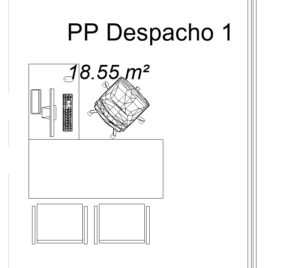
You have a family downloaded from the internet. It is a super cool chair that looks great in your renders.
The problem?
It is a CAD import. Because the family came from the internet, violating the first point. It may come from SketchUp or a similar program. It has a huge number of edges and polygons.
To make matters worse, you have added some transparency to the furniture category to make it look more “friendly.”
It is 2:00 PM on a Friday and you need to issue all the drawings for the new layout.
Since it is an office building, this chair appears 200 times.
The process drags on forever and you do not know why. You end up frustrated, leaving two hours later than planned.
Why?
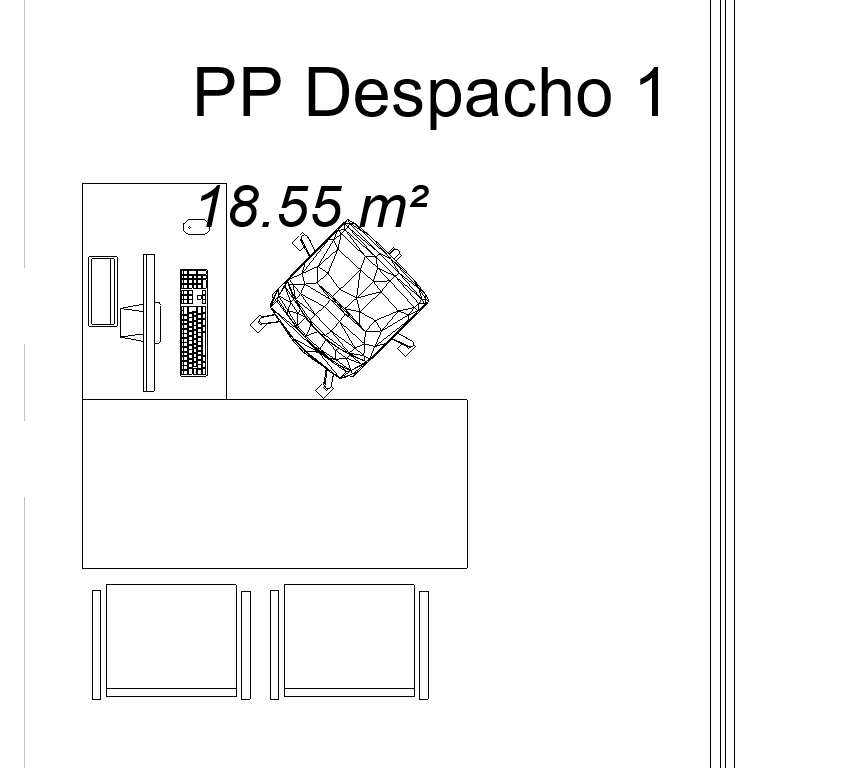
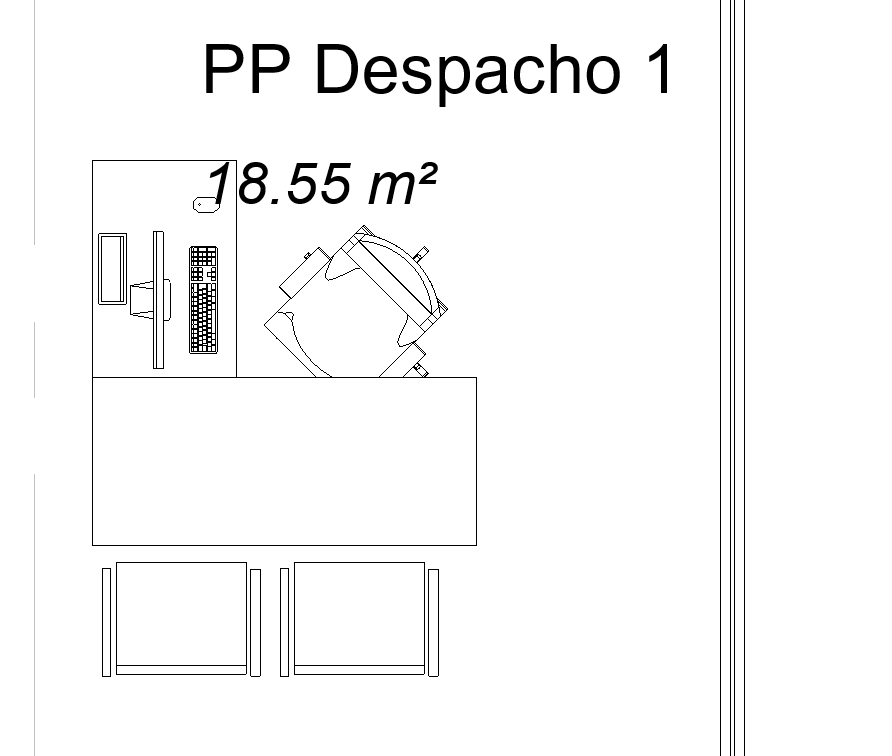
To process a view, Revit checks everything along the entire depth configured in that view (we will later publish a post on best practices when setting up drawings, where we will specify that the best approach is to define the optimal view depth for each case. No more, no less). Therefore, if we have an object where 50 lines are visible, it will have to process 10,000 additional lines when perhaps we could have done it with 800 if we had represented it with a simple square, for example.
The solution?
Use nested detail elements in the family you want to represent and hide the 3D geometry when viewing it in plan. Thanks to this, Revit will only process a 2D element with a few lines and will not complicate itself trying to read 3D geometry in plan view.
There will be cases where we will need to use a generic annotation instead of a detail element. Mainly because it may be a small element such as a light fixture or a socket outlet. In these cases, we will gain the same advantages.
If you include this among your best practices with families in Revit, you will save a lot of time on unforeseen issues.
MEP families, better without a host

Many times we believe that by creating a wall-based, ceiling-based, or floor-based family we will gain productivity. According to our experience, nothing could be further from the truth.
Example:
We are an engineering firm and we must produce drawings based on an external architectural model. We proceed to develop a downlight family that we will use in a large number of cases.
Since this type of luminaire is always placed in ceilings, our common sense tells us to develop it using the “face-based Generic Model” template so that it can be hosted in the suspended ceiling, so that is what we do.
Once it is finished, we go to insert it into the model. The first thing we notice is that we need a view where the ceiling can be clearly seen, such as a reflected ceiling plan.
After everything is modeled and represented in drawings, we receive an update of the architectural model. In this model, the suspended ceilings have been lowered by 5 cm and all our luminaires have lost their host because the ID of each ceiling has changed.
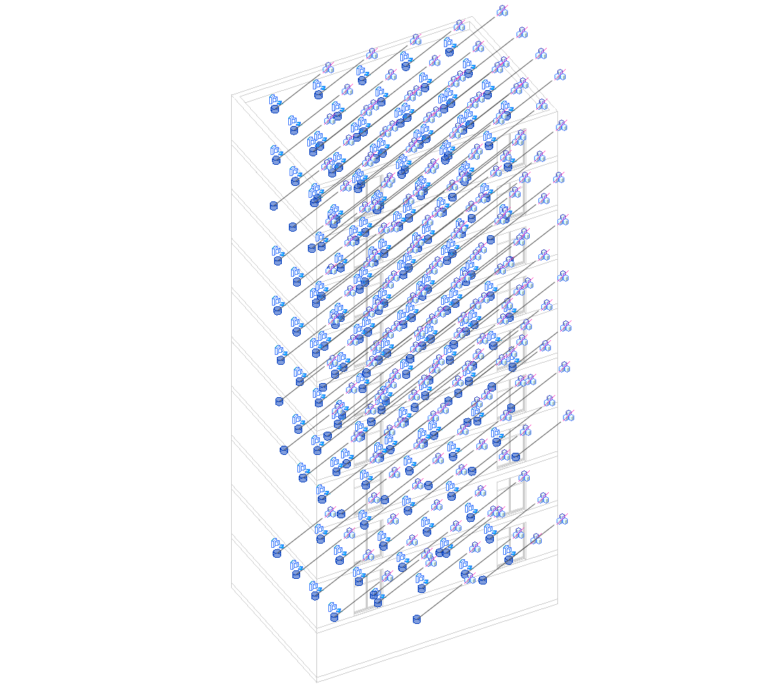
Now, one by one, we must select those “orphaned” luminaires to reassign them.
If this element had been level-based, we would only have needed to change the offset to adjust all the luminaires “in one go.”
For that reason, our recommendation is that families should be non-hosted, especially MEP families and even more so when working with models external to our organization.
WHY CHOOSE US?
At VBB, we have a team of BIM experts with extensive experience in the construction industry.
Our core values are quality, innovation, and client satisfaction. We are committed to providing tailored solutions that align with your vision and objectives.
TRANSFORM YOUR PROJECTS WITH OUR SERVICES!
Don’t fall behind in the race toward the construction of the future. Contact VBB and discover how our BIM Consultancy can transform your projects, save you time and money, and improve the quality of your constructions. Together, we can take your business to the next level.
Get in touch with us to start building the future together.
We are looking for talented professionals to strengthen our team.
This is a great opportunity for candidates with experience in engineering, BIM and the UAE construction market.
Send us your CV to info@vbbengineering.com we would be happy to hear from you!